

It’s no secret that AI is changing the way people create content. What once took hours can now be done much faster with the right tools. From writing blog posts and social media captions to creating images, videos, and audio, AI for content creators is becoming part of everyday content work. AI for Content Creators: 12 Best AI Content Creation Tools in 2026?
The number of AI tools is growing quickly, and new options appear almost every day. That sounds exciting, but it can also make choosing the right tool confusing. Some tools help with writing, while others focus on images, video, editing, or research.
In this guide, you’ll discover 12 of the best AI content creation tools for 2026–27. You’ll also learn how they can save time, improve your workflow, and help you create better content.
What Is AI Content Creation and How Does It Work?
AI content creation means using artificial intelligence to help create digital content. This can include text, images, videos, audio, scripts, captions, and marketing materials. Modern systems use natural language processing, machine learning, and large language models to understand instructions and produce useful outputs.
The process usually begins with an instruction called a prompt. The creator explains the goal, audience, format, tone, and important details. The AI then analyzes the request and produces an output. Better AI prompts usually produce better results. This is why prompt engineering has become an important skill for modern creators.
What Can AI Create for Content Creators?

AI can support almost every stage of the creative process. A blogger can use an AI writing assistant for research and drafts. A YouTuber can generate scripts and titles. A designer can use an AI image generator for visual concepts. A podcaster can use AI audio tools for editing and transcription.
The biggest advantage is flexibility. One idea can become several formats. A blog post can become social media captions, a newsletter, a video script, and short-form posts. This process is called content repurposing. It helps creators extend the life of their original work.
AI-Assisted vs AI-Generated Content
There is an important difference between AI-assisted and fully AI-generated content. AI-assisted content uses artificial intelligence for selected tasks. The creator still provides ideas, judgment, facts, experience, and final editing.
Fully generated content relies heavily on automation. It may be faster, but it can also sound generic or contain mistakes. For serious publishing, human review remains important. Google says its systems focus on helpful, reliable, people-first content rather than simply rewarding or rejecting content based on whether AI was used.
Benefits of Using AI Tools for Content Creation
The biggest benefit of AI content creation tools is speed. A task that once required several hours can often be completed much faster with the right workflow. AI can help generate brainstorming ideas, research questions, outlines, drafts, titles, and variations.
AI also supports content productivity. Instead of spending your entire morning creating one social post, you can use that time for strategy and audience engagement. The technology can assist with content scaling without requiring a large team.
How AI Helps Creators Save Time
Imagine a YouTube creator preparing a ten-minute video. The creator still needs the idea and final creative direction. However, AI can help organize the research, create a first script, suggest titles, generate descriptions, and prepare social media content.
The same idea works for bloggers. AI can assist with keyword research, SEO headlines, outlines, meta descriptions, and SEO content. These tasks are useful because they reduce repetitive work while leaving the important decisions with the creator.
How AI Helps Creators Produce More Content
AI can also make one piece of content more valuable. A long interview can become podcast content, a YouTube video, short clips, social posts, and an email newsletter. A product review can become a blog article, comparison table, video script, and marketing copy.
This approach is more useful than simply publishing more content. The goal is to create a stronger content workflow. Good creators use AI to multiply useful ideas rather than produce large amounts of repetitive material.
How to Choose the Right AI Content Creation Tool
Choosing the right content creation software depends on what you actually create. A blogger may need strong writing and research features. A video creator may care more about video editing, captions, voiceovers, and video generation. A designer may need image generation and editing.
Price also matters. Many platforms offer free access with limits. Paid plans may provide more generations, advanced models, collaboration features, or commercial capabilities. You should also check privacy policies, licensing terms, integrations, export options, and whether the tool fits your existing workflow.
Best AI Tools for Different Types of Content Creators

| Creator Type | Useful AI Capability | Typical Content |
| Blogger | AI writing and research | Blog posts |
| YouTuber | Script, video, voice | YouTube content |
| Designer | Image and design generation | Visual content |
| Podcaster | Transcription and editing | Podcast content |
| Marketer | Copy and automation | Marketing campaigns |
| Social Creator | Captions and short videos | Social media content |
| Course Creator | Outlines and lessons | Online course content |
The best tool is not necessarily the tool with the most features. It is the tool that solves your biggest creative problem. A simple tool that fits your workflow can be more useful than an advanced platform you rarely use.
12 Best AI Content Creation Tools in 2026

The AI creator market now covers writing, research, design, video, audio, and marketing. Some platforms focus on one job. Others combine several creative tasks in one workspace. Current products are also moving toward conversational and agentic workflows. Canva, for example, describes Canva AI 2.0 as a conversational creative system that can support work from an initial idea through final design.
| AI Tool | Main Strength | Useful For |
| ChatGPT | Writing and ideation | Bloggers and creators |
| Jasper | Marketing content | Marketers |
| Canva | Design and visuals | Social creators |
| Copy.ai | Marketing workflows | Businesses |
| Grammarly | Editing | Writers |
| Descript | Video and audio editing | YouTubers and podcasters |
| Synthesia | AI avatar videos | Business creators |
| InVideo | AI video creation | Video creators |
| Murf | AI voiceovers | Video creators |
| Perplexity | Research | Researchers and writers |
| HubSpot | Marketing workflows | Businesses |
| Adobe Firefly | Creative generation | Designers and creators |
ChatGPT — Best for Content Ideas and Writing
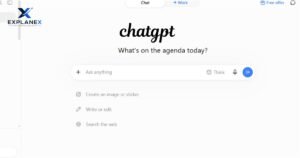
ChatGPT can support brainstorming, outlining, drafting, rewriting, research planning, and content transformation. It can function as an AI writing assistant during different stages of a creator’s workflow.
For example, you can provide a topic and audience. Then ask for several angles, an outline, interview questions, or social captions. The strongest results usually come when you add your own facts, examples, experience, and editorial direction.
Jasper — Best for Marketing Content
Jasper focuses heavily on marketing and brand-focused content. It can help creators develop campaigns, advertisements, landing pages, and other forms of marketing copy.
Its value becomes clearer when consistency matters. A brand may need the same brand voice across emails, advertisements, websites, and social platforms. AI can help maintain that consistency when properly configured.
Canva — Best for Visual Content
Canva combines design tools with AI capabilities. Its current Canva AI direction includes conversational creation and editing within its broader design environment.
For creators, this can be useful for thumbnails, presentations, social graphics, posters, and other visual assets. It is especially useful when you want to move from an idea to an editable design without switching between many applications.
Copy.ai — Best for Marketing Workflows
Copy.ai is designed around content and marketing workflows. It can help with tasks such as campaign content, sales copy, and repetitive marketing processes.
This makes it relevant to creators who also run businesses. A creator selling a digital product, for example, may need landing page copy, email sequences, advertisements, and product messaging.
Grammarly — Best for Editing
Grammarly is useful after the first draft is complete. It can help with grammar checking, spelling and punctuation, clarity, and tone.
That editing stage matters because raw AI output can sound repetitive. A human review combined with AI content editing can make writing clearer and more natural.
Descript — Best for Video and Podcast Editing
Descript focuses on video and audio workflows. Its AI features can help creators edit spoken content and turn recordings into polished media. Its own 2026 overview describes AI tools across writing, video, audio, and image workflows while emphasizing the importance of a human editing pass.
For podcasters and YouTubers, this can reduce repetitive editing work. A transcript-based workflow can make it easier to find sections, remove unwanted parts, and prepare content for different platforms.
Synthesia — Best for AI Avatar Videos
Synthesia is focused on AI-generated presenter videos and AI avatars. This can be useful when a creator needs instructional, educational, training, or business videos without recording every presentation manually.
The creator still needs to provide a useful script. A realistic avatar cannot fix weak information. The value comes from combining efficient production with clear and useful content.
InVideo — Best for AI Video Creation
InVideo focuses on video creation and can help turn ideas or scripts into video projects. This is useful for creators producing frequent social videos or educational material.
An AI video generator can reduce the technical barrier to video production. However, creators should still review visuals, timing, narration, facts, and overall storytelling before publishing.
Murf — Best for AI Voiceovers
Murf is designed for AI voice generation. It can help creators produce narration for videos, presentations, advertisements, and other digital projects.
An AI voice generator can be useful when recording equipment or studio time is limited. Still, voice selection matters. The wrong tone can make otherwise useful content feel artificial.
Perplexity — Best for Research
Perplexity can help creators explore topics and find information during the research stage. This can support topic ideas, research questions, and source discovery.
Research tools should not replace fact-checking. Important claims should be checked against reliable primary sources. This is especially important for health, finance, law, technology specifications, and other sensitive topics.
HubSpot — Best for AI-Powered Content Marketing
HubSpot combines marketing, CRM, and automation capabilities. For businesses and professional creators, this can connect content production with broader content marketing strategy.
The advantage is workflow integration. Instead of treating every post as a separate task, creators can connect content with campaigns, customer communication, and marketing automation.
Adobe Firefly — Best for Generative Visual Content
Adobe Firefly has expanded into a broader creative AI environment covering image, video, audio, and other creative tasks. Adobe currently describes Firefly as an all-in-one creative studio with more than 30 AI models.
Its newer Firefly AI Assistant is designed to coordinate multi-step creative workflows across Adobe applications. That can help creators move from an idea to production while keeping more of the process inside one ecosystem.
Best AI Tools for Writing and Blog Content
Writing is one of the most common uses of AI for content creators. Modern AI writing tools can help with ideas, outlines, drafts, editing, summaries, and variations. They can also support long-form content and short-form content.
However, AI should not become a shortcut for original thinking. A strong article still needs a clear argument, accurate information, useful examples, and a distinct perspective. AI can accelerate blog content creation, but the creator should remain responsible for the final result.
AI Tools for Blog Posts and Long-Form Content
For bloggers, a practical workflow begins with research. The creator identifies the audience and search intent. AI can then help develop content ideas, organize sections, and create an initial draft.
The next stage is human editing. Add firsthand examples, original explanations, useful data, and relevant sources. Google specifically recommends content that provides original information, analysis, experience, or substantial value instead of simply rewriting existing material.
AI Tools for Social Media Writing
Social media requires concise communication. AI can transform a long article into social media captions, short posts, hooks, and ad copy.
The creator should still adapt each version to the platform. A LinkedIn post does not need the same structure as a TikTok caption. Context matters more than simply generating more variations.
AI Tools for SEO Content Creation
AI can assist with keyword research, topic clustering, SEO headlines, outlines, and meta descriptions. It can also help identify questions readers may have about a topic.
SEO should support the reader rather than control the entire writing process. Google states that its systems prioritize helpful content created for people and warns against using extensive automation primarily to manipulate search rankings.
Best AI Tools for Images and Visual Content
Visual content has become central to modern publishing. An AI image generator can turn a written concept into a visual starting point. Creators can use these systems for blog graphics, thumbnails, illustrations, product concepts, and social posts.
The technology is also moving beyond simple image generation. Current creative platforms increasingly combine text-to-image generation, editing, design, and other media in one workflow. Adobe and Canva are examples of platforms moving toward broader AI-assisted creative environments.
AI Image Generators for Bloggers and Creators
A blogger can describe an article concept and create a visual direction before publishing. For example, an article about AI productivity could use a workspace scene showing a creator working with several digital tools.
The important part is consistency. Repeated styles, colors, layouts, and visual themes can improve brand consistency. AI should support the creator’s visual identity instead of producing random images for every article.
AI Tools for YouTube Thumbnails and Social Graphics
Thumbnails need clarity more than complexity. AI can help generate concepts, backgrounds, subjects, and layout ideas. The creator can then refine the design manually.
The same approach works for Instagram posts, Pinterest graphics, presentations, and promotional images. Good visuals communicate the main idea quickly. They should not overwhelm the viewer with unnecessary elements.
AI Tools for Editing and Enhancing Images
AI editing can remove backgrounds, modify objects, improve images, and make creative changes faster. This reduces repetitive work for creators.
For professional projects, licensing still matters. Before commercial publication, check the specific tool’s current terms and the rights attached to generated or uploaded material. AI capabilities and licensing policies can change over time.
Best AI Tools for Video, Audio, and Voice Content
Video production often requires several separate tasks. There is scripting, recording, editing, captions, sound, thumbnails, and distribution. AI can connect many of these steps.
Modern AI video generator platforms can support text-to-video generation, while AI audio tools can assist with transcription, cleanup, and editing. Text-to-speech systems can also create narration. These capabilities can make video production more accessible to solo creators.
Best AI Video Tools for YouTubers

A YouTuber can use AI during almost every stage of production. The process can start with brainstorming ideas and research. It can then move into scripting, visual planning, editing, captions, and repurposing.
The important difference is between assistance and automation. AI can handle repetitive production work. The creator should still control the story, message, examples, and final quality.
Best AI Audio and Voice Tools for Podcasters
Podcasters can use AI for transcription, cleanup, summaries, clips, and podcast editing. These features can save time after recording.
AI voices can also help with narration. However, creators should consider audience expectations and disclosure where appropriate. Authentic voices and real conversations often remain central to podcast identity.
Best AI Tools for Short-Form Video Creators
Short videos depend on strong hooks and fast pacing. AI can help generate scripts, captions, visual ideas, and multiple versions from longer content.
This is where content repurposing becomes powerful. One long interview can become several short clips. The creator can then distribute those clips across multiple platforms.
How to Create High-Quality Content With AI
High-quality AI content starts before the AI tool is opened. First, define the audience, goal, topic, and desired result. Then provide detailed instructions. Explain the tone, format, length, audience knowledge, important facts, and restrictions.
After generation, review the output carefully. Check facts, examples, sentence structure, tone and clarity, and originality. Add your own experience. Replace generic statements with specific information. The result should feel like useful work created for real people.
How to Write Better AI Prompts
A strong prompt gives AI enough context to understand the task. Instead of asking for “a blog post about fitness,” explain the target audience, purpose, format, tone, subject, structure, and information requirements.
This is the practical side of prompt engineering. The goal is not to make prompts unnecessarily complicated. The goal is to reduce ambiguity so the AI understands what you actually need.
How to Humanize AI-Generated Content
Humanizing content does not mean adding random mistakes. It means adding real perspective, specific examples, useful explanations, and natural language.
A creator can include personal observations, original research, customer questions, expert interviews, case studies, or practical demonstrations. These elements give human-like content more substance and identity.
How to Fact-Check AI Content Before Publishing
AI can produce confident statements that are incomplete or incorrect. Always verify important claims using reliable sources.
For factual articles, check dates, statistics, product features, prices, regulations, and quotations. When possible, use primary sources. This is especially important when the content could affect someone’s money, health, safety, or legal decisions.
Challenges and Limitations of AI Content Creation
The biggest challenge is quality. AI can generate text quickly, but speed does not guarantee usefulness. Generic content can lack original thinking, personal experience, and strong examples.
Another issue is accuracy. AI systems can make factual mistakes. They can also misunderstand context or create information that sounds convincing but cannot be verified. Human review is therefore a necessary part of responsible automated content generation.
Can AI-Generated Content Be Trusted?
AI-generated material should be treated as a draft rather than automatic truth. Trust depends on the task and the verification process.
For simple brainstorming, a small mistake may not matter. For financial statistics or technical instructions, it can matter greatly. The more important the claim, the stronger the verification should be.
Does AI Replace Human Content Creators?
AI changes the creative workflow, but it does not remove the need for human judgment. Creators decide what matters, what their audience needs, and what perspective they want to communicate.
The strongest workflow combines machine speed with human experience. AI can generate possibilities. Humans choose which possibilities are useful and turn them into meaningful work.
“Focus on people-first content” — Google Search Central.
AI Content Creation Best Practices for 2026
The best AI content strategy starts with usefulness. Do not create content simply because an AI tool can produce it quickly. Start with a real audience problem and build something that solves it.
Google’s current guidance emphasizes original, useful, people-first content. It also warns against producing large amounts of low-value content through automation for search manipulation.
Build an AI-Powered Content Creation Workflow
A practical workflow can move from research to ideas, outline, creation, editing, fact-checking, publishing, and content distribution. AI can assist with many stages.
The creator remains responsible for quality. This approach makes AI a productivity layer rather than an automatic publishing machine. It also makes the workflow easier to repeat.
Combine AI With Human Creativity
AI is excellent at generating possibilities. Humans are better positioned to provide personal experience, judgment, context, taste, and responsibility.
That combination is especially useful in the creator economy. A solo creator can use AI tools for creators to handle repetitive tasks while spending more time developing ideas and connecting with an audience.
What Will AI Content Creation Look Like in the Future?
AI tools are moving toward connected workflows. Instead of using one tool for writing and another for design, creators increasingly have platforms that combine several creative capabilities.
Adobe’s 2026 Firefly developments show this direction clearly. Its creative assistant can coordinate multiple steps across Adobe’s creative applications.
The future will likely involve more AI-assisted creation across writing, design, video, audio, research, and marketing. Yet the core principle remains simple. Useful ideas still need human direction.
Final Thoughts on AI for Content Creators

AI for content creators is becoming less about generating one piece of content and more about building a complete creative system. The strongest creators can use AI for research, ideas, writing, design, editing, video, audio, and distribution without handing over complete creative control.
The goal should not be to publish the most content. It should be to create content that people actually want to read, watch, hear, save, and share. AI can make the process faster. Human creativity makes the result valuable.
When used carefully, AI tools for marketers, AI tools for businesses, and AI tools for creators can reduce repetitive work and increase creative capacity. The winning workflow is not human versus AI. It is human creativity supported by intelligent tools.
FAQs
15 Best AI Tools for Teachers in 2026: Free Tools That Actually Help?
What Is Artificial Intelligence? 5 Simple Things to Know